How Automatic Video Subtitles and Translation Work
Whisper AI transcribes your video, ArgosTranslate converts it to any language, and FFmpeg burns the subtitles in — entirely on your computer, no internet subscription required.
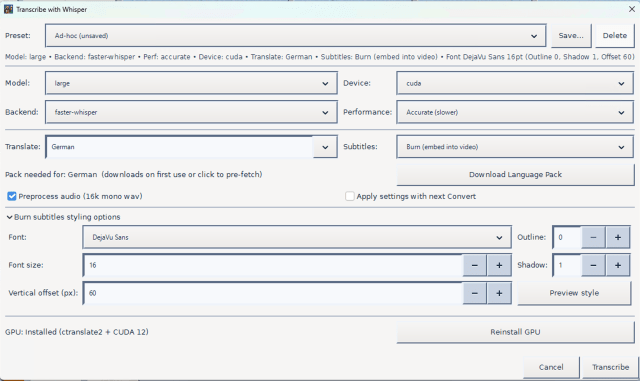
Ever watched a video in a foreign language and wished the subtitles would just appear by themselves? That is exactly what the subtitle and translation feature in FFmpeg Commander does — and it does it entirely on your computer, with no internet subscription, no uploading your footage to a cloud service, and no technical knowledge required.
The Big Picture: Four Steps to Subtitled Video
- Audio is extracted from your video
- A speech recognition model listens to the audio and writes down everything it hears
- A translation model converts the text into your chosen language
- The subtitles are burned into the video using FFmpeg
Each step feeds directly into the next. You just choose your language, pick your quality level, and press go.
Step 1 — Listening to the Audio: Meet Whisper
The speech recognition engine powering FFmpeg Commander is called Whisper, an open-source AI model built by OpenAI and released to the public. Whisper was trained on hundreds of thousands of hours of real human speech in dozens of languages, which makes it remarkably good at understanding natural conversation — accents, background noise, overlapping voices and all.
Whisper does not just transcribe words. It also timestamps every segment of speech, noting exactly when each phrase starts and ends. Those timestamps are what make your subtitles sync up with the video.
Choosing the Right Model Size
Whisper comes in several sizes — the size you pick is a trade-off between speed and accuracy:
- Tiny / Base — Very fast, works on almost any computer. Best for clear, slow speech with minimal background noise. Can miss short phrases and quiet voices.
- Small — A good everyday balance. Catches most normal conversation without being too slow.
- Medium — Noticeably better at difficult audio: strong accents, fast speech, brief exchanges at the start of a scene.
- Large / Large-v3 — The most accurate model available. Handles short utterances, overlapping speakers, and challenging accents far better than smaller models. Slower on CPU but worth it when quality matters.
Tip: If subtitles are missing for short conversations — especially near the beginning of a video — switching from Small to Large will often solve it. Larger models are much better at detecting brief bursts of speech.
Balanced vs Accurate Mode
FFmpeg Commander also lets you choose between Balanced and Accurate processing modes.
- Balanced uses a compressed version of the model (called int8 quantization) that runs faster but makes slightly more mistakes, particularly with quiet or short speech.
- Accurate runs the model at full precision, giving you the best possible transcript. It is slower on CPU but is the right choice when you need every word captured correctly.
CPU vs GPU — Why Hardware Matters for Speed
Transcribing speech with an AI model is computationally demanding. The device you choose inside FFmpeg Commander makes a dramatic difference in how long you wait.
CPU Mode
CPU mode works on every computer with no additional setup — it is the universal fallback. The downside is speed: transcribing a 10-minute video with the Large model on a modern CPU can take anywhere from 5 to 20 minutes. Perfectly usable, just not fast.
NVIDIA GPU — CUDA Acceleration
If your Windows machine has an NVIDIA graphics card, FFmpeg Commander can install a CUDA-accelerated version of the transcription engine with a single click using the built-in GPU Installer. CUDA offloads the heavy calculations from your CPU onto your GPU, which is purpose-built for exactly this kind of parallel number crunching.
A transcription job that takes 15 minutes on CPU can complete in 1 to 2 minutes on a mid-range NVIDIA GPU. High-end cards like the RTX 3080 or 4090 can process audio faster than real time — meaning a 10-minute video is done in under a minute.
FFmpeg Commander handles the entire CUDA setup for you. You just click Install GPU Addon, wait a few minutes, and from that point on every transcription runs at full GPU speed.
Apple VideoToolbox — Mac Hardware Acceleration
On macOS, FFmpeg Commander uses Apple VideoToolbox and the Metal GPU framework, built directly into every Mac. There is nothing to install — Apple Silicon Macs (M1, M2, M3, M4) are exceptionally fast at this workload because their Neural Engine is designed for exactly this type of AI inference.
An M2 MacBook Pro running the Large model can transcribe a 10-minute video in roughly 2 to 3 minutes — competitive with a dedicated NVIDIA GPU, while consuming a fraction of the power. VideoToolbox is enabled automatically on Mac with no configuration needed.
Speed Comparison
| Device | Large model, 10 min video | Setup required |
|---|---|---|
| CPU (modern desktop) | 5 – 20 minutes | None — works out of the box |
| NVIDIA GPU (CUDA) | 1 – 3 minutes | One-click GPU Addon install |
| Apple Silicon (VideoToolbox) | 2 – 4 minutes | None — automatic on Mac |
Step 2 — What Is an SRT File?
Once Whisper has finished listening, the result is saved as an SRT file — SubRip Text — one of the most widely supported subtitle formats in the world. Here is what one looks like:
1
00:00:03,200 --> 00:00:05,800
Hello, welcome to our show.

2
00:00:06,500 --> 00:00:09,100
Today we are talking about something exciting.
Each entry has three parts: a sequence number, a timecode showing when the subtitle appears and disappears, and the subtitle text itself. Plain text — any video player, editor, or streaming platform can read it. SRT files are also what YouTube and Vimeo accept when you upload your own captions.
FFmpeg Commander saves this file alongside your video automatically, so you always have a standalone subtitle file you can edit, share, or reuse.
Step 3 — Translation: Meet ArgosTranslate
If you want subtitles in a different language than the one spoken in the video, FFmpeg Commander passes the SRT text through a second AI model called ArgosTranslate — an open-source translation engine that runs entirely on your machine. No API keys, no sending your script to a third-party server.
It works by downloading a language pack for the specific pair of languages you need. Language packs are downloaded once and reused forever. If a pack is missing when you click Transcribe, FFmpeg Commander downloads it automatically before proceeding — nothing breaks, it just takes a moment longer on the first run.
How the Timing Stays Accurate After Translation
Translated text is often a different length than the original — a sentence that takes two seconds to say in English might translate to a much longer phrase in German. FFmpeg Commander handles this with a smart timing system:
- Word-level timestamps — The model notes exactly when each word was spoken. Subtitles are trimmed to disappear when the last word finishes.
- Reading speed floor — Even if speech was very fast, the subtitle stays on screen long enough for a normal reader to finish.
- Gap enforcement — A small breathing gap is always preserved between consecutive subtitles so the screen never feels cluttered.
- Hard maximum — No subtitle lingers for more than 6 seconds, even if the original segment was unusually long.
Step 4 — Burning Subtitles Into the Video
The final step is handled by FFmpeg. It reads the SRT file and burns the subtitle text directly into the video frames — called hardcoding or burning in subtitles.
Hardcoded subtitles are permanently part of the video. They show up on any device, any player, any platform — no separate file needed, no settings to configure. Perfect for sharing on social media, messaging apps, or anywhere you cannot guarantee the viewer has a subtitle-capable player.
You can customise the look of your subtitles before burning — font, size, colour, outline, and position on screen are all adjustable inside FFmpeg Commander.
Everything Runs on Your Computer
None of this requires an internet connection after the initial model download. Your video footage never leaves your machine. There are no usage limits and no privacy concerns about uploading sensitive recordings to a cloud service.
The first time you use a new language or model size, FFmpeg Commander downloads it automatically in the background. After that, everything is instant.
Supported Translation Languages
Additional languages are planned for future updates.
Getting Started
- Open your video in FFmpeg Commander
- Go to the Subtitles / Transcription section
- Choose your model size — Large is recommended for best results
- Select CUDA or let the app auto-detect your GPU for faster processing
- Select your target language if you want translation
- Click Transcribe — the app handles everything else automatically
The first run will download any required models and language packs. Every run after that uses the locally cached versions and completes much faster.
FFmpeg Commander includes Whisper AI transcription, translation, and subtitle burn-in — one-time purchase, no subscription.
Get FFmpeg Commander →FFmpeg Commander Video Toolbox — 2026