Insert Photos Into Your Video Timeline
Published June 9, 2026
Drop one or more photos directly into your video at any point on the timeline — Ken Burns zooms, fades, and slide-ins, with audio kept in sync, all rendered in a single pass by the Director Workbench.
Photo Insert — Drop Photos Straight Into Your Timeline
The newest timed effect in the Director Workbench lets you insert one or more photos directly into a video's timeline — no manual editing, no separate slideshow tool. Pick the spot in your video, choose your photos, and FFmpeg Commander builds the transition, animation, and audio handling for you automatically.
How It Works
Add a Photo Insert effect in the Director Workbench, drop it onto your timeline where you want the photo to appear, and choose one or more image files. For each photo, set how long it stays on screen, pick an animation, and pick a color style. Preview the result live in the player, then render — FFmpeg Commander handles splitting the source video, inserting the slideshow, keeping audio in sync, and re-encoding the final clip.
Animation Styles
- Static — clean, no motion
- Ken Burns In / Out — smooth, classic zoom
- Ken Burns In + Fade — zoom combined with a fade overlay
- Fade In/Out — gentle fade transition
- Slide In Left / Right — photo slides in from either edge of the frame
Color Styles
Each photo can also be styled independently — Normal, Black & White, Sepia, Warm, or Cool — so a photo can match the mood of the surrounding footage or stand out on purpose.
Tip: Mix and match across multiple photos in the same insert — a quick black-and-white slide-in followed by a warm Ken Burns zoom, for example — all rendered in a single pass, with the rest of your video and audio carrying on seamlessly before and after.
Captions — Add a Title to Each Photo
Every photo in a Photo Insert can now have its own optional caption. Type a line of text — a date, a place, a name, whatever fits — and it's burned in as a clean lower-third title with a soft semi-transparent backing bar, so it stays readable over any image.
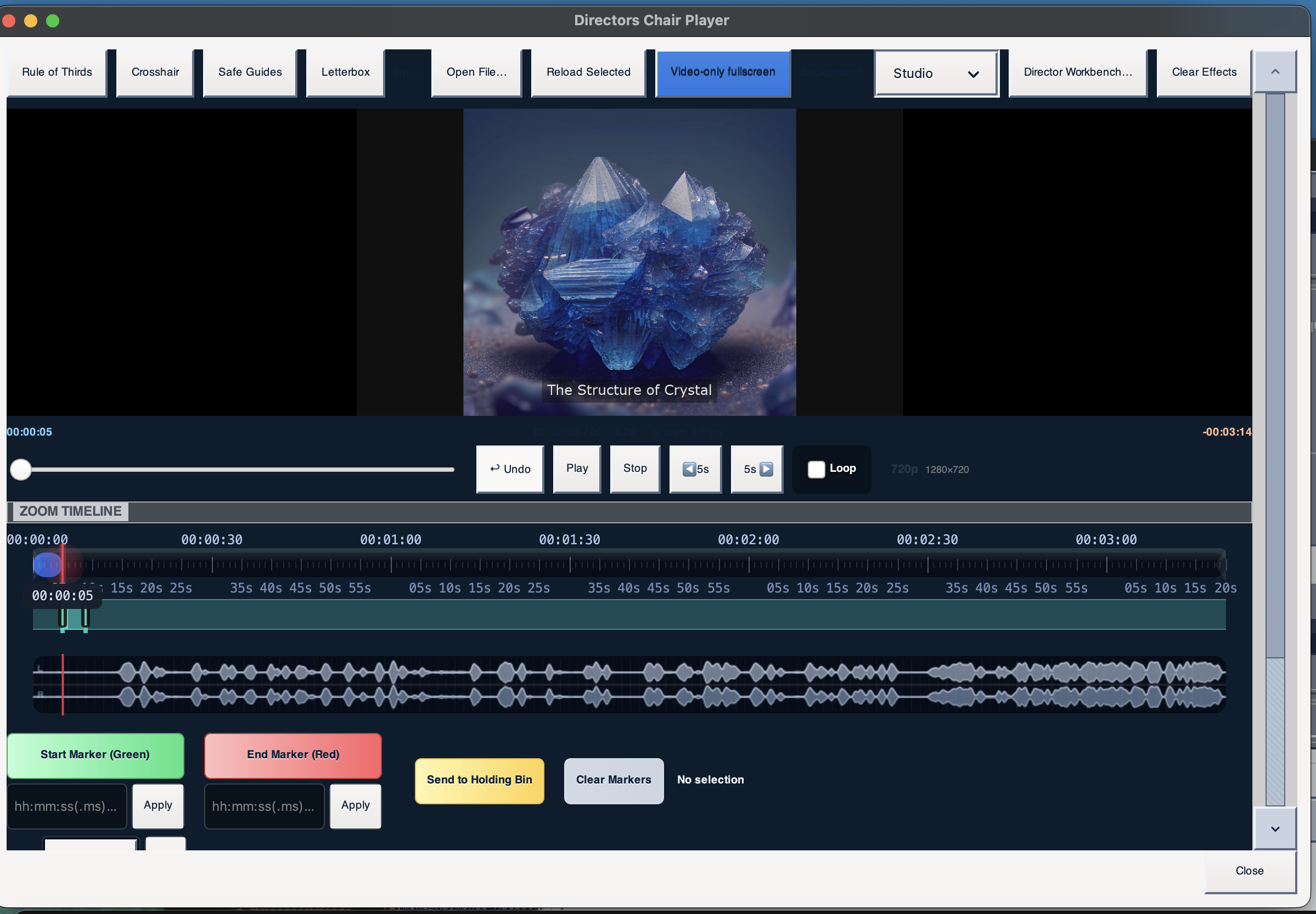
Live preview in the Director's Chair Player — caption "The Structure of Crystal" burned into the photo, combined with a Ken Burns zoom.
Captions work with every animation and color style, so a slide-in or Ken Burns zoom can carry its own title without any extra editing steps.
Photo Insert is the latest addition to the Director Workbench's suggestion engine, which now offers 15 effects in total — all stackable in FFmpeg Commander:
- Punch-in + Gentle Sharpen
- Warm Contrast Bump
- Letterbox Matte
- Rule-of-Thirds Reframe
- Auto-Highlight Reel
- Montage Reveal (2×2 Grid)
- Film Grain
- Tilt-Shift Miniature
- Chromatic Aberration
- Monochrome Mood Pass
- Color Grade (LUT)
- Speed Burst
- Director's Pause
- Color Drain
- Photo Insert
Ready to drop your own photos into a video? FFmpeg Commander includes Photo Insert and much more — one-time purchase, no subscription.
Get FFmpeg Commander — $45 →New to FFmpeg? See how to use FFmpeg without the command line.
FFmpeg Commander Video Toolbox — 2026