Direct Call New
Free, encrypted peer-to-peer video calls from your Mac straight to theirs. No server, no account, no company in the middle. Built into Screen Capture for Mac.
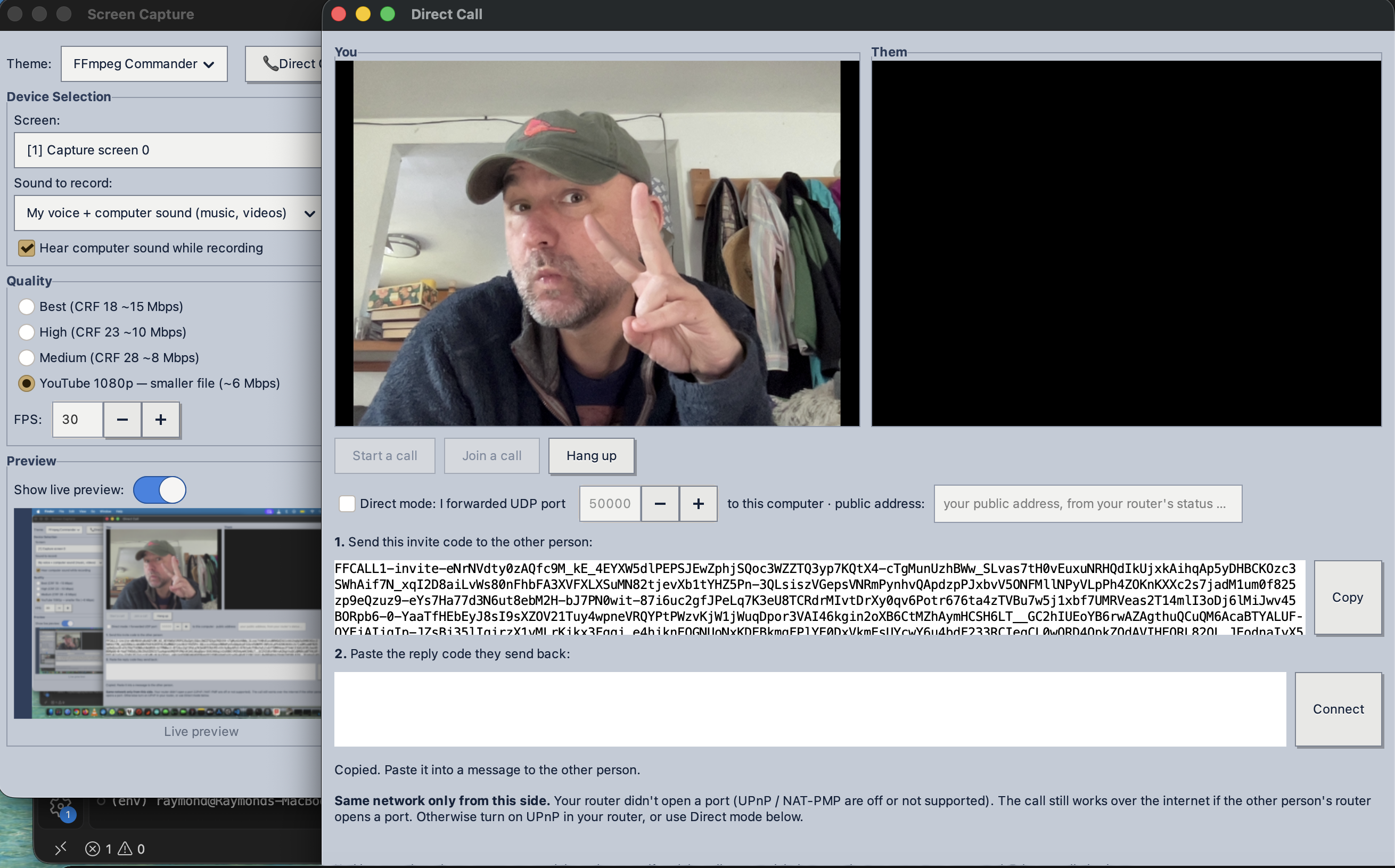
No middle man. Really none.
Almost every video-call app runs your call through the company that makes it. You sign up with an account, your contact list lives on their servers, and they know who you call, when, and for how long. Even when the call itself is encrypted, you are trusting that company with everything around it.
Direct Call has no server at all:
- No account. Nothing to sign up for, no password, no profile, no contact list stored anywhere.
- No company in the path. I don't run a server for it, so there is nothing for me to log, sell, or hand over, and nothing that can go down.
- One address check, nothing more. To put your internet address in the invite code, the app asks your router, or, if the router won't say, a simple address-check site (the same answer you get from
curl ifconfig.me). That site only sees your address; your call never goes anywhere near it.
So how do the two Macs find each other? You introduce them. One of you sends an invite code, the other sends a reply code back, and from that moment the two computers talk to each other and only to each other.
How a call works
- Press Start a call. You get an invite code. Send it to the other person however you like.
- They press Join a call, paste your code, press Make reply code, and send that back to you.
- Paste their reply and press Connect. The two Macs connect directly and the call starts.
- Read the safety code to each other. If both screens show the same 15 digits, nobody is sitting in between.
How the encryption works
Direct Call uses WebRTC, the same open standard browsers use for video calls. The difference is that the setup messages, which normally go through a company's server, go through you instead.
- Each Mac makes a fresh lock for every call. When a call starts, each side creates a brand-new random encryption certificate. It is never reused and never leaves that Mac.
- The codes carry the lock's fingerprint. Your invite code includes a fingerprint of your certificate: a short summary of it that can't be faked.
- The Macs agree on keys directly. Over the direct connection, each side checks that the other's certificate matches the fingerprint in the code it was sent. Then the two work out the call's keys together, using a method that never sends the keys themselves over the network.
- Everything is encrypted before it leaves your Mac. Every video frame and every bit of sound is encrypted with those keys, and every packet carries a tamper check. A packet that was changed along the way is thrown away.
- Hang up and the keys are gone. They only ever existed in the two Macs' memory, for that one call.
| Part | What it uses | Strength |
|---|---|---|
| Each side's certificate (proves who you're connected to) | ECDSA, P-256 curve | 256-bit, about as strong as 3072-bit RSA |
| Agreeing on the call's keys | DTLS, the same handshake as secure websites | New keys every call, deleted at hang-up |
| Your video and sound | SRTP with AES | 128-bit key |
| Tamper check on every packet | HMAC-SHA1 | 80-bit check; changed packets are dropped |
Is 128-bit enough? Yes. AES-128 is what browser video calls use, and nobody has ever broken it. Trying every possible key would take longer than the age of the universe, even with every computer on Earth working on it.
The safety code
Encryption protects a call from anyone listening in. The safety code protects against something sneakier: a person who intercepts your codes and swaps in their own, so that each of you is actually connected to them.
Both Macs turn the two certificate fingerprints into the same 15-digit number, shown as five groups of three, like 612 560 586 835 627. If anyone swapped the codes, your two screens would show different numbers. Read them to each other and you know.
Why 15 digits and not 6? Someone trying to fake a match has to keep generating certificates until both numbers happen to line up, and computers are fast at that:
| Safety code | Tries needed on average | Time on a MacBook Air (~280,000 tries a second) |
|---|---|---|
| 6 digits | 1 million | about 4 seconds |
| 15 digits (Direct Call) | 1 million billion | about 110 years |
And it would have to happen live, in the few minutes while you're waiting for the other person's reply.
What stays private, and what doesn't
No call is invisible, so here is exactly what can be seen, and by whom:
| What | Who can see it |
|---|---|
| Your picture and voice | Only the two Macs in the call |
| The encryption keys | Nobody. They're made during the call and never sent anywhere |
| The invite and reply codes | Whoever can read the chat you send them through. No secrets in them, but they include your internet address |
| That two computers connected, when, and for how long | Your internet providers see encrypted traffic between two addresses, not what's in it |
| Your internet address | The person you call (it's a direct connection, so there's no server hiding it), and the address-check site, which sees nothing but that address |
Calling over the internet
Each invite and reply code carries that Mac's public internet address and the port the call uses. When you press Connect, both Macs send to each other at the same moment, and most home routers let the call straight through. No port forwarding, no router settings.
- If your router can open a port on request (UPnP or NAT-PMP), the app uses that too and closes it again when you hang up.
- On the same network (the same home or office Wi-Fi) it connects locally and never leaves the building.
- Direct mode is there for the rare network that blocks this: forward one UDP port to your Mac and tick the box.
Some office, hotel and mobile-hotspot networks block direct connections entirely. If both of you are on one of those, the call can't connect. That's the price of having no relay server in the middle, and I'd rather be upfront about it than quietly route your call through one.
Talk on speakers: echo cancellation is built in
Without headphones, a call picks up its own sound: the other person's voice comes out of your speakers, goes back into your mic, and they hear themselves. Direct Call removes it with the same echo canceller browsers use, running right on your Mac. Noise suppression and automatic mic level are on too.
In testing, it cut the echo sent back to the other person by 13 to 20 dB, down to roughly a fifth of its level or less. Headphones still give the cleanest sound, but you don't need them.
The permissions macOS will ask for
The first time you start or join a call, macOS asks for three things. Click Allow on each:
- Camera, so the other person can see you.
- Microphone, so they can hear you.
- Local Network ("find devices on local networks"), so the app can reach the other Mac and talk to your router.
Questions people ask
Is Direct Call free?
Yes. It's part of Screen Capture for Mac, which is free: no account, no subscription and no ads.
Do I need an account or a phone number?
No. There's nothing to sign up for. You start a call, send the invite code to the other person yourself (by text, email or Signal), and they send a reply code back.
Is Direct Call end-to-end encrypted?
Yes. Every video frame and every bit of sound is encrypted on your Mac before it leaves (DTLS-SRTP with AES-128), and only the two Macs in the call have the keys. A 15-digit safety code on both screens lets you check that nobody is in between.
Does it work over the internet, or only on the same Wi-Fi?
Over the internet. Each code carries that Mac's public address, and when you press Connect the two Macs reach each other directly. Most home networks need no setup at all; some office, hotel and phone-hotspot networks block direct connections.
Is it an alternative to FaceTime, Zoom or Google Meet?
For a one-to-one call between two Macs, yes, without an account and without a company server in the middle. FaceTime needs an Apple Account, and Zoom and Google Meet route your call through their servers. Direct Call is for two people at a time.
Can the person I call see my IP address?
Yes. It's a direct connection, so there's no server hiding your address. For friends and family that's no problem; it shows roughly which city or region you're in, not your street address.
Does it work on Windows, Linux or iPhone?
Not yet. Direct Call is Mac to Mac for now (Screen Capture 1.6.1 or newer on both sides). Linux is planned.
Requirements
- Both of you need Screen Capture for Mac 1.6.1 or newer. Mac to Mac for now; Linux is planned.
- A Mac with Apple Silicon (M1 or newer) and a recent version of macOS
- A camera and microphone. The ones built into your Mac are fine
Built on open standards, not secrets
None of the security here is home-made. The call runs on GStreamer's WebRTC, the connection on libnice, the encryption on OpenSSL and libsrtp, and the echo cancellation on the WebRTC audio-processing library. These are open, widely reviewed pieces with years of use behind them. My part is putting them together so the setup goes through you and not through a company.
Direct Call lives inside Screen Capture, my free screen recorder for Mac, from the same workshop as FFmpeg Commander.